
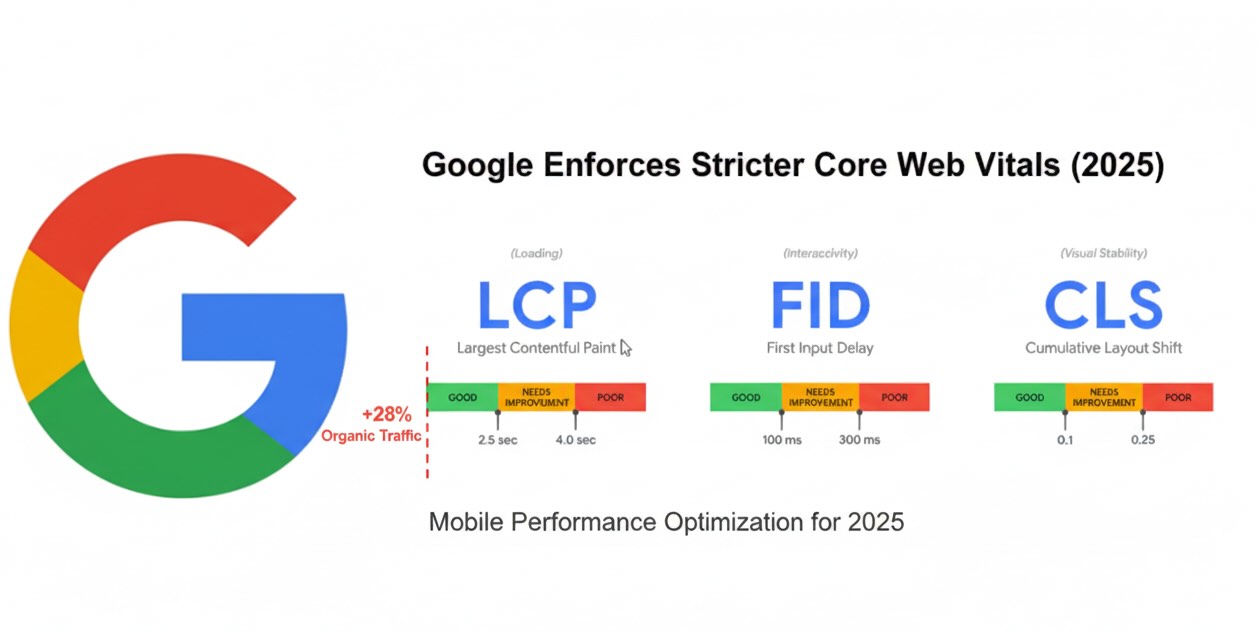
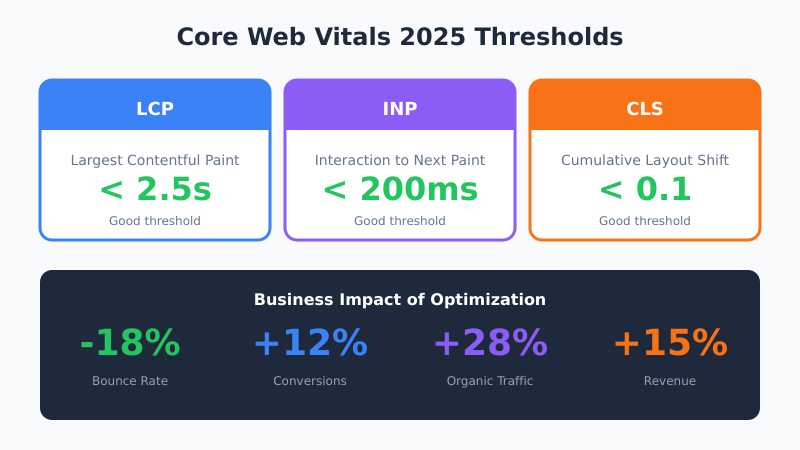
Google has significantly tightened Core Web Vitals requirements for 2025, making mobile performance optimization a critical ranking factor with stricter thresholds for Largest Contentful Paint (LCP), Interaction to Next Paint (INP), and Cumulative Layout Shift (CLS). The updated standards mandate LCP under 2.5 seconds, INP below 200 milliseconds, and CLS under 0.1 for good performance ratings, with mobile-first indexing now treating these metrics as indexing requirements rather than mere ranking signals.
Real-world case studies demonstrate dramatic business impact from Core Web Vitals optimization, with one global e-commerce platform achieving an 18% decrease in bounce rates by improving LCP from 4.1 to 2.2 seconds. The same optimization efforts resulted in 12% higher conversion rates through INP improvements and 9% reduction in cart abandonment through CLS fixes, ultimately generating 28% increased organic traffic and 15% revenue growth.
Understanding Each Core Web Vital Metric
Each Core Web Vital measures a distinct aspect of user experience. Understanding what triggers poor scores helps identify optimization priorities for your specific site architecture and content type.
Largest Contentful Paint (LCP)
LCP measures how long it takes for the largest visible content element to render — typically a hero image, video thumbnail, or large text block. Google considers LCP the most important loading performance metric because it represents when users perceive the page as “ready.”
Common LCP problems include unoptimized images served without proper compression or modern formats, slow server response times due to database queries or inadequate hosting, render-blocking JavaScript and CSS that delays content display, and client-side rendering that requires JavaScript execution before showing content.
Interaction to Next Paint (INP)
INP replaced First Input Delay (FID) in March 2024 as a more comprehensive interactivity metric. While FID only measured the first interaction, INP evaluates responsiveness throughout the entire page session, capturing all clicks, taps, and keyboard inputs.
Poor INP scores typically stem from long-running JavaScript tasks that block the main thread, heavy third-party scripts from analytics, ads, or chat widgets, inefficient event handlers that trigger expensive operations, and lack of code splitting causing browsers to parse unnecessary JavaScript.
Cumulative Layout Shift (CLS)
CLS quantifies visual stability by measuring unexpected layout shifts during page load. Nothing frustrates users more than clicking a button only to have the page shift and trigger an unintended action — a common problem with ads and dynamically loaded content.
Layout shifts occur when images and embeds lack explicit dimensions, fonts load and cause text reflow, ads inject without reserved space, and dynamic content inserts above existing content. Each shift multiplies its impact score by the distance moved, making large shifts exponentially more damaging.
Mobile-First Indexing Integration
With 60-70% of all browsing traffic originating from mobile devices, Core Web Vitals performance directly impacts search visibility under Google’s universal mobile-first indexing approach. Sites failing mobile usability tests face significant ranking penalties, while optimized mobile experiences benefit from enhanced search placement and user engagement signals that compound ranking improvements.
The 2025 updates establish Core Web Vitals as fundamental technical SEO requirements, with Google’s AI algorithms measuring real user metrics at unprecedented scale to update rankings rapidly based on actual performance data. This real-time measurement approach means performance degradation can immediately impact search visibility, requiring continuous monitoring and optimization rather than periodic audits.
Step-by-Step Optimization Guide
Systematic Core Web Vitals optimization follows a predictable workflow. Start with measurement, identify the worst-performing metric, implement fixes, and verify improvements before moving to the next issue.
Step 1: Measure Current Performance
Begin with PageSpeed Insights to get both lab data (simulated tests) and field data (real user measurements from Chrome UX Report). Field data matters more for rankings because it reflects actual user experience, but lab data helps diagnose specific issues.
Google Search Console’s Core Web Vitals report provides site-wide performance data grouped by URL pattern, making it easy to identify problem page templates. The report distinguishes between mobile and desktop performance — focus on mobile first since that’s what Google indexes.
Step 2: Optimize LCP
Identify your LCP element using Chrome DevTools Performance panel or PageSpeed Insights diagnostics. For images, implement these optimizations: serve WebP or AVIF formats with JPEG fallbacks, use responsive images with srcset attributes, preload the LCP image in the document head, and ensure proper caching headers.
For server-side improvements, enable compression (Brotli preferred over Gzip), implement a CDN for static assets, optimize database queries, and consider edge caching for dynamic content. Reducing Time to First Byte (TTFB) below 200ms significantly improves LCP scores.
Step 3: Improve INP
Audit JavaScript execution using Chrome DevTools Performance panel. Look for long tasks (over 50ms) that block the main thread. Break large scripts into smaller chunks using dynamic imports, defer non-critical JavaScript, and move heavy computations to Web Workers.
Third-party scripts often cause INP problems. Audit each script’s impact using tools like WebPageTest, delay non-essential scripts until after page load, and consider self-hosting critical third-party resources to control their loading behavior.
Step 4: Fix CLS Issues
Add explicit width and height attributes to all images and video elements. For responsive images, use CSS aspect-ratio property to reserve space before loading. Reserve space for ads using min-height on container elements, and load web fonts with font-display: swap to prevent invisible text during loading.
Dynamic content requires careful handling. When inserting new elements, add them below the viewport or use CSS transforms for animations that don’t trigger layout recalculation. Skeleton screens provide perceived loading progress without causing layout shifts.
Essential Tools for Monitoring
Effective Core Web Vitals optimization requires both synthetic testing and real user monitoring. Synthetic tools like Lighthouse, PageSpeed Insights, and WebPageTest provide controlled measurements for debugging. Real user monitoring (RUM) tools capture actual visitor experience across diverse devices and network conditions.
Free RUM options include Google’s web-vitals JavaScript library, which sends Core Web Vitals data to your analytics platform. For WordPress sites, plugins like Perfmatters and WP Rocket include built-in performance monitoring. Enterprise solutions like Cloudflare Web Analytics, New Relic, and SpeedCurve provide detailed RUM dashboards.
Advanced Optimization Strategies
Technical optimization now requires sophisticated approaches including Content Delivery Network (CDN) implementation to reduce latency, server-side rendering for JavaScript-heavy websites, and modern image format adoption (WebP, AVIF) with proper compression. Mobile-first design principles mandate fluid grid systems, thumb-friendly touch targets, and modal popup optimization to prevent user experience disruption on smaller screens.
LCP optimization focuses on preloading critical assets including fonts and hero images while eliminating render-blocking CSS and JavaScript that delays initial content display. INP improvements require JavaScript execution time reduction through code splitting, Web Workers for heavy script processing, and third-party tag optimization to prevent interaction delays.
Common Mistakes to Avoid
Many optimization attempts backfire due to common misconceptions. Lazy loading every image hurts LCP when applied to above-the-fold content — only lazy load images below the initial viewport. Similarly, deferring all JavaScript can delay critical functionality; prioritize scripts based on their impact on user experience.
Over-relying on lab data leads to optimizations that don’t improve real user experience. A page might score 100 on Lighthouse while failing Core Web Vitals in Search Console because lab tests use consistent network conditions that don’t reflect your actual audience’s devices and connections.
Ignoring third-party scripts is another frequent mistake. That chat widget, social sharing buttons, or analytics tag manager might contribute more to poor INP than your own code. Audit third-party impact regularly and remove scripts that don’t provide measurable business value.
Business Impact and Competitive Advantages
Organizations prioritizing Core Web Vitals optimization gain measurable competitive advantages through improved user engagement, higher conversion rates, and enhanced search visibility. Sites achieving good Core Web Vitals scores experience lower bounce rates, extended session durations, and increased user interactions that Google’s algorithms recognize as positive engagement signals.
The performance improvements create cascading business benefits including improved mobile user experience, higher search rankings, increased organic traffic, and enhanced conversion rates that directly impact revenue growth. Companies treating Core Web Vitals as strategic business priorities rather than technical requirements position themselves advantageously as Google continues emphasizing user experience in search algorithms.
Implementation and Monitoring Framework
Successful Core Web Vitals optimization requires quarterly audits using PageSpeed Insights, Search Console monitoring, and Real User Monitoring (RUM) for live performance insights. Cross-team collaboration between SEO specialists, UX/UI designers, and developers ensures holistic approaches that balance performance optimization with user experience and business objectives.
Future-proofing strategies include hosting improvements, cloud-native solutions, and Progressive Web Application adoption to maintain competitive performance as standards continue evolving. The investment in Core Web Vitals optimization provides long-term competitive advantages as Google integrates additional performance metrics including accessibility and energy efficiency signals into ranking algorithms.
Bottom Line
Core Web Vitals optimization in 2025 requires systematic measurement, targeted improvements, and continuous monitoring. Start with your worst-performing metric, implement proven fixes, and verify improvements before moving to the next issue. The sites that master these fundamentals gain significant advantages in search visibility, user engagement, and conversion rates.
