
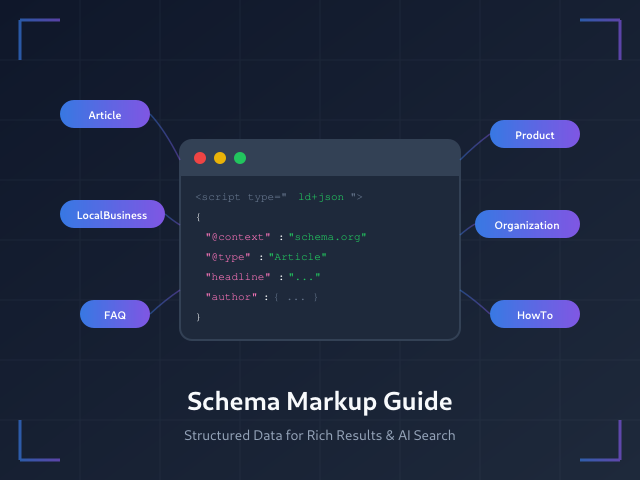
Schema markup transforms how search engines interpret your content, enabling rich results that dramatically increase click-through rates. With AI-powered search becoming mainstream in 2025, structured data has evolved from a nice-to-have enhancement to a fundamental SEO requirement. Sites with properly implemented schema see 20-30% higher CTR compared to standard listings — and increasingly appear in AI Overviews and voice search results.
This guide covers everything you need to implement schema markup effectively: the essential types for different content, JSON-LD implementation, testing procedures, and common mistakes that prevent rich results from appearing.
What Is Schema Markup
Schema markup is standardized code added to your HTML that helps search engines understand your content’s meaning, not just its text. Created collaboratively by Google, Bing, Yahoo, and Yandex through Schema.org, this vocabulary uses structured key-value pairs to describe entities like products, articles, businesses, and events.
Without schema, search engines see text. With schema, they understand that “Apple” refers to the company (not fruit), that “$499” is a price (not random text), and that “4.8 stars” represents a customer rating. This precision enables rich results — those enhanced search listings with star ratings, prices, images, and other compelling details that stand out in search results.
Why Schema Matters More in 2025
Schema markup has always improved search visibility, but three developments make it essential in 2025.
AI Overviews and Generative Search
Google’s AI Overviews pull information from websites to generate summary answers. Testing shows that pages with high-quality schema markup appear more frequently in these AI-generated responses than pages without structured data. Google explicitly recommends schema as a best practice for appearing in AI Overviews and AI Mode features.
This extends beyond Google. AI assistants like ChatGPT, Perplexity, and Claude increasingly reference web content. Structured data helps these systems extract accurate information and cite your content as a source.
Voice Search Optimization
Voice assistants need precise, structured answers. When someone asks “What time does the pharmacy close?” the assistant needs structured LocalBusiness data with opening hours — not a paragraph of text to parse. FAQ and HowTo schema particularly benefit voice search by providing direct question-and-answer pairs.
Rich Results Competition
As more competitors implement schema, standard search listings become invisible. Product searches now show prices, ratings, and availability directly in results. Recipe searches display cooking times and calorie counts. Without schema, your listings compete without these visual advantages.
JSON-LD: The Recommended Format
Three formats exist for implementing schema: JSON-LD, Microdata, and RDFa. Google explicitly recommends JSON-LD, and for good reason.
JSON-LD (JavaScript Object Notation for Linked Data) sits in a script tag in your page’s head section, completely separate from your HTML content. This separation provides significant advantages:
- Easier maintenance — Schema code doesn’t interweave with content, so updates don’t risk breaking page layout
- CMS compatibility — Most CMS platforms and plugins generate JSON-LD automatically
- Dynamic generation — JavaScript can construct schema based on page content
- Cleaner code — HTML remains readable without embedded attributes
Here’s a basic JSON-LD structure:
<script type="application/ld+json">
{
  "@context": "https://schema.org",
  "@type": "Article",
  "headline": "Your Article Title",
  "author": {
    "@type": "Person",
    "name": "Author Name"
  },
  "datePublished": "2025-01-20",
  "image": "https://example.com/image.jpg"
}
</script>
Every JSON-LD block requires @context (always “https://schema.org”) and @type (the schema type you’re implementing). Additional properties depend on the specific type.
Essential Schema Types
Schema.org defines hundreds of types, but a handful drive most SEO value. Focus on these based on your content.
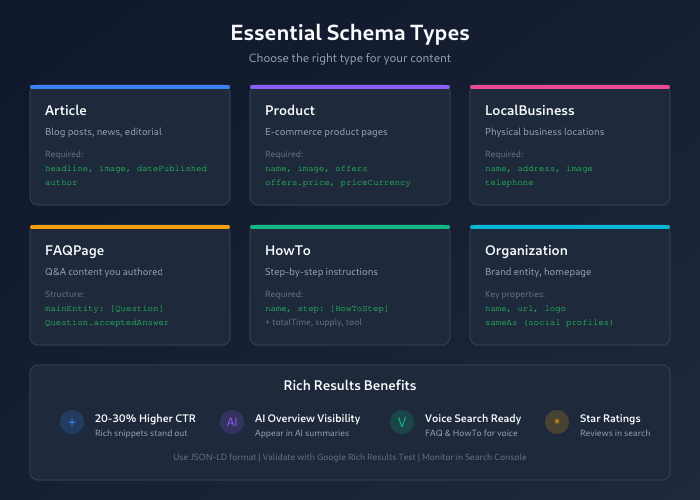
Article Schema
Use Article schema for blog posts, news articles, and editorial content. This schema helps search engines understand authorship, publication dates, and content categorization.
Required properties:
headline— Article titleimage— Featured image URL (Google requires images for Article rich results)datePublished— Publication date in ISO 8601 format (YYYY-MM-DD)author— Person or Organization who wrote the content
Recommended properties:
dateModified— Last update datepublisher— Organization that published the contentdescription— Brief summary
Use specific subtypes when applicable: NewsArticle for news content, BlogPosting for blog posts, TechArticle for technical documentation.
LocalBusiness Schema
LocalBusiness schema is essential for any physical business location. It inherits properties from both Organization and Place types, enabling you to specify both business details and location information.
Required properties:
name— Business nameaddress— Physical address with street, city, state, postal codeimage— Business photo or logotelephone— Contact phone number
Recommended properties:
openingHours— Business hourspriceRange— Price indicator ($ to $$$$)geo— Latitude and longitude coordinatesaggregateRating— Overall customer rating
Use specific subtypes for better targeting: Restaurant, Dentist, AutoRepair, LegalService. The more specific the type, the better search engines understand your business.
Product Schema
Product schema enables rich results showing prices, availability, and ratings directly in search results — critical for e-commerce visibility.
Required properties:
name— Product nameimage— Product imageoffers— Price and availability information
The offers property requires nested details:
price— Numeric price valuepriceCurrency— Currency code (USD, EUR, etc.)availability— Stock status (InStock, OutOfStock, PreOrder)
Recommended properties:
aggregateRating— Customer rating with review countbrand— Product manufacturersku— Product identifierdescription— Product description
FAQ Schema
FAQPage schema marks up question-and-answer content, potentially displaying expandable FAQ results directly in search. This schema works well for dedicated FAQ pages and for Q&A sections within articles.
Structure:
@type: FAQPage— Container for all questionsmainEntity— Array of Question items- Each Question contains
name(the question) andacceptedAnswer(the answer)
Important: Only use FAQ schema for questions you’ve written and answered yourself. Don’t use it for user-generated Q&A content — that requires QAPage schema instead.
HowTo Schema
HowTo schema structures step-by-step instructions, enabling rich results that display individual steps, time estimates, and required materials.
Required properties:
name— Title of the how-to guidestep— Array of HowToStep items
Recommended properties:
totalTime— Time required to complete (ISO 8601 duration format)estimatedCost— Approximate costsupply— Materials neededtool— Tools requiredimage— Images for each step
HowTo schema particularly benefits voice search — assistants can read steps sequentially to users.
Organization Schema
Organization schema establishes your brand entity in Google’s Knowledge Graph. While it doesn’t directly trigger rich results, it helps Google understand your brand and can influence knowledge panels.
Key properties:
name— Official organization nameurl— Official websitelogo— Brand logo imagesameAs— Array of official social media profilescontactPoint— Customer service contact information
Place Organization schema on your homepage or About page.
Implementation Guide
Follow these steps to implement schema markup correctly.
Step 1: Identify Schema Opportunities
Audit your content to determine which schema types apply:
- Blog posts → Article or BlogPosting
- Product pages → Product
- Service pages → Service
- About page → Organization
- Contact page → LocalBusiness (if physical location)
- FAQ sections → FAQPage
- Tutorial content → HowTo
Step 2: Generate Schema Code
Several approaches work depending on your technical comfort level:
Manual coding: Write JSON-LD directly using Schema.org documentation as reference. Best for developers who want precise control.
Schema generators: Tools like TechnicalSEO.com’s generator create code through form inputs. Good for learning and one-off implementations.
CMS plugins: WordPress plugins like Yoast SEO, Rank Math, and Schema Pro automate schema generation. Most efficient for ongoing content.
Step 3: Add Schema to Pages
Place JSON-LD in your page’s <head> section or just before the closing </body> tag. Both locations work, but <head> is conventional.
Critical rule: Only mark up content that actually appears on the page. Schema must accurately describe visible content — marking up information that doesn’t exist on the page violates Google’s guidelines and can result in manual actions.
Step 4: Test and Validate
Always validate schema before deploying. Use these tools:
- Google Rich Results Test — Shows whether your page is eligible for rich results and displays any errors
- Schema Markup Validator — Checks syntactical correctness against Schema.org specifications
- Google Search Console — Reports schema errors across your entire site after indexing
Fix all errors before launch. Warnings are less critical but worth addressing when possible.
Common Schema Mistakes
These errors frequently prevent rich results from appearing.
Marking Up Invisible Content
Schema must describe content users can see. Adding Product schema with reviews when no reviews appear on the page violates guidelines. Google may issue manual penalties for deceptive markup.
Missing Required Properties
Each schema type has required properties. Product schema without offers won’t trigger rich results. Article schema without image won’t display enhanced listings. Check Google’s structured data documentation for requirements.
Using Generic Types
Specific types outperform generic ones. Use Restaurant instead of LocalBusiness for restaurants. Use NewsArticle instead of Article for news. Specific types enable more targeted rich results.
Incorrect Date Formats
Dates must use ISO 8601 format: 2025-01-20 or 2025-01-20T14:30:00+00:00. Human-readable formats like “January 20, 2025” cause validation errors.
Duplicate Schema Conflicts
Multiple plugins or manual code can create duplicate schema. Two Article schemas on the same page confuse search engines. Audit pages with browser developer tools to identify conflicts.
Schema and Rankings: The Reality
Google has stated that schema markup is not a direct ranking factor. Your position in search results won’t improve simply by adding structured data.
However, schema indirectly impacts rankings through several mechanisms:
- Higher CTR — Rich results attract more clicks, sending positive engagement signals
- Better comprehension — Search engines understand content more accurately, improving relevance matching
- Voice search visibility — Structured content gets selected for voice responses
- AI overview inclusion — Schema increases chances of appearing in AI-generated summaries
Think of schema as a visibility multiplier. It won’t fix thin content or replace quality, but it maximizes the visibility of good content.
WordPress Schema Implementation
WordPress users have several options for adding schema markup.
Yoast SEO automatically generates Organization, WebSite, and basic Article schema. The premium version adds more schema types and control.
Rank Math includes extensive schema support in its free version, with 20+ schema types and a visual schema builder.
Schema Pro (paid) offers the most comprehensive WordPress schema solution with conditional logic and custom schema support.
For custom implementations, add JSON-LD through your theme’s wp_head action hook or use a plugin like “Insert Headers and Footers” to add code without editing theme files.
Monitoring Schema Performance
After implementation, monitor these metrics in Google Search Console:
- Enhancements reports — Show valid items, warnings, and errors for each schema type
- Rich results status — Indicates which pages are eligible for enhanced displays
- CTR changes — Compare click-through rates before and after schema implementation
Check these reports monthly. New errors often appear after site updates or CMS changes.
Bottom Line
Schema markup has evolved from an SEO enhancement to a baseline requirement. With AI-powered search growing and rich results dominating SERPs, structured data directly impacts your content’s visibility and click-through rates.
Start with the schema types most relevant to your content: Article for blogs, Product for e-commerce, LocalBusiness for physical locations, FAQ for question-and-answer content. Use JSON-LD format, validate with Google’s testing tools, and monitor performance in Search Console.
The implementation effort pays compounding returns as search engines increasingly rely on structured data for both traditional results and AI-generated responses.
