On-Page SEO: The Complete Optimization Guide
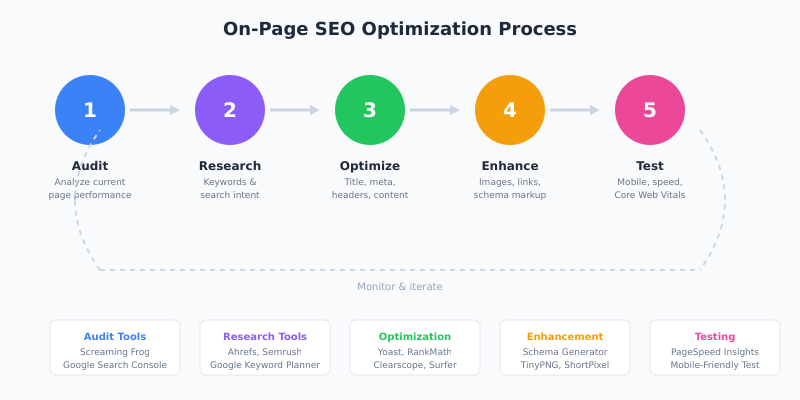
You can build a million backlinks, but if your pages aren’t optimized for search engines and users, you’re leaving rankings on the table. On-page SEO is the foundation that makes everything else work—from link building to content marketing.
The good news: on-page optimization is entirely within your control. Unlike backlinks, which depend on others, you can implement these changes today. In this guide, I’ll walk through every on-page factor that matters in 2026, from title tags to Core Web Vitals.
What Is On-Page SEO?
On-page SEO (also called on-site SEO) refers to optimizing individual web pages to rank higher and earn more relevant traffic. It includes both the content itself and the HTML source code—everything that happens on your website, as opposed to off-page factors like backlinks.
Think of on-page SEO as making your content easy to understand—for both users and search engines. Google’s algorithms have become remarkably good at understanding context and intent. However, you still need to give clear signals about what your page covers. That’s where on-page optimization comes in.
On-Page vs Off-Page vs Technical SEO
| Type | What It Covers | Examples |
|---|---|---|
| On-Page SEO | Content and HTML elements on the page | Title tags, headings, content, images, internal links |
| Off-Page SEO | External signals pointing to your site | Backlinks, brand mentions, social signals |
| Technical SEO | Site infrastructure and crawlability | Site speed, mobile-friendliness, XML sitemaps, robots.txt |
In practice, these categories overlap. For example, page speed affects both technical SEO and on-page user experience. Similarly, internal linking is an on-page tactic with technical implications, and JavaScript rendering sits squarely on the line between the two. Nevertheless, understanding these distinctions helps you approach optimization systematically.
Title Tag Optimization
The title tag is arguably the most important on-page element. It appears in three critical places: browser tabs, search results, and social shares. Google uses it as a primary signal for understanding what your page is about.
Title Tag Best Practices
- Put your primary keyword first. Keywords at the beginning carry more weight. Instead of “A Complete Guide to On-Page SEO,” use “On-Page SEO: The Complete Guide.”
- Keep it under 60 characters. Google truncates longer titles in search results. Aim for 50-60 characters to ensure your full title displays.
- Make it compelling. Your title competes with nine other results on page one. Add numbers, power words, or the current year to increase clicks.
- Include your brand (optional). For brand awareness, add your site name at the end: “On-Page SEO Guide | YourBrand”
- Avoid keyword stuffing. “SEO Tips, SEO Guide, SEO Tutorial, SEO Help” looks spammy and won’t rank.
In my experience, front-loading keywords in title tags consistently improves rankings for competitive terms. I’ve seen pages jump 5-10 positions simply by restructuring their titles to lead with the target keyword.
Title Tag Formula
Here’s a formula that works well for most content:
[Primary Keyword]: [Benefit or Clarification] ([Year] or [Number])Examples:
- On-Page SEO: 15 Factors That Actually Matter in 2026
- Email Marketing: How to Double Open Rates (With Templates)
- React Performance: 12 Optimization Techniques for Faster Apps
Meta Description Optimization
The meta description doesn’t directly affect rankings—Google confirmed this years ago. However, it significantly impacts click-through rate (CTR), which does influence rankings indirectly. A compelling meta description can be the difference between a click and a scroll-past.
Meta Description Best Practices
- Length: 120-156 characters. Shorter descriptions may look incomplete; longer ones get truncated.
- Include target keyword: Google bolds matching terms, making your result stand out visually.
- Add a call-to-action: Phrases like “Learn how,” “Discover,” or “Get started” encourage clicks.
- Match search intent: If someone searches “how to,” your description should promise a tutorial.
- Be specific: “15 actionable tips” beats “tips and tricks” every time.
Important: Google sometimes rewrites meta descriptions if it thinks its version better matches the search query. This happens more often with vague or poorly-written descriptions. Consequently, write descriptions that precisely match your content.
Header Tags (H1-H6) Structure
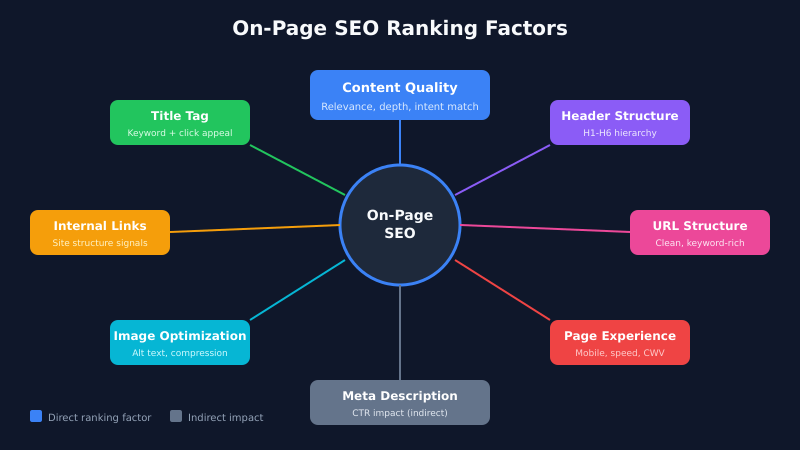
Header tags create a hierarchical structure that helps both users and search engines understand your content. Think of them as an outline—H1 is the title, H2s are main sections, and H3s are subsections.
Header Hierarchy Rules
- One H1 per page. The H1 should match or closely relate to your title tag. It’s typically the article title.
- Use H2s for main sections. Each major topic in your content gets an H2.
- Use H3s for subsections. Points within an H2 section become H3s.
- Don’t skip levels. Going from H2 to H4 breaks the logical hierarchy. Always use sequential levels.
- Include keywords naturally. Work your target keyword into at least one H2. Don’t force it into every heading.
Here’s a proper header structure example:
H1: On-Page SEO: The Complete Guide for 2026
  H2: What Is On-Page SEO?
    H3: On-Page vs Off-Page vs Technical SEO
  H2: Title Tag Optimization
    H3: Title Tag Best Practices
    H3: Title Tag Formula
  H2: Header Tags Structure
    H3: Header Hierarchy Rules
  H2: Content Optimization
    H3: Keyword Placement
    H3: Content Length
Google has stated that using proper header tags “helps Google understand the structure of the page.” While headers aren’t a massive ranking factor on their own, they improve crawlability and user experience. Furthermore, well-structured content is more likely to win featured snippets.
URL Structure Optimization
Your URL is one of the first things Google sees when crawling a page. A clean, descriptive URL provides context before the crawler even reads your content.
URL Best Practices
| Do This | Not This |
|---|---|
/on-page-seo-guide/ | /post?id=12847 |
/email-marketing-tips/ | /2026/01/20/email-marketing-tips-and-tricks-complete-guide/ |
/react-performance/ | /blog/articles/development/javascript/react/performance-guide/ |
Key principles:
- Include target keyword. URLs with keywords correlate with higher rankings.
- Keep it short. Shorter URLs tend to perform better. Aim for 3-5 words.
- Use hyphens, not underscores. Google treats hyphens as word separators (
on-page-seo= three words). - Avoid dates (unless time-sensitive). Dates make content look outdated and create problems when updating.
- Use lowercase. URLs are case-sensitive on some servers. Stick to lowercase to avoid duplicate content issues.
On-Page SEO Content Optimization
Content is the core of on-page SEO. You can optimize every technical element perfectly, but without quality content that matches search intent, you won’t rank. Google’s algorithms have become exceptionally good at evaluating content quality, relevance, and comprehensiveness.
Keyword Placement
Strategic keyword placement helps Google understand your topic without resorting to keyword stuffing. Here’s where to include your primary keyword:
- First 100-150 words. Google gives more weight to terms that appear early. Introduce your topic immediately.
- H1 heading. Your main headline should contain the primary keyword.
- At least one H2. Include a natural variation in a subheading.
- Throughout the body. Use naturally, aiming for 0.5-2% density. Never force it.
- Conclusion. Reinforce the topic at the end of your content.
- Image alt text. Where relevant and descriptive (more on this below).
Additionally, use semantic keywords—related terms and synonyms that Google expects to see. For “on-page SEO,” semantic keywords include “meta tags,” “header optimization,” “content optimization,” and “internal linking.” Tools like Clearscope, Surfer SEO, or even Google’s “related searches” can help identify these terms.
Content Length and Depth
There’s no magic word count for SEO. The right length depends on search intent and competition. However, research consistently shows that comprehensive content outperforms thin content for competitive keywords.
A study by Backlinko found that the average first-page result contains 1,447 words. That said, correlation isn’t causation—longer content ranks well because it tends to be more comprehensive, not because word count is a ranking factor.
Guidelines by content type:
| Content Type | Typical Length | Notes |
|---|---|---|
| Blog posts | 1,500-2,500 words | Comprehensive coverage of topic |
| Ultimate guides | 3,000-5,000+ words | Definitive resource on subject |
| Product pages | 300-1,000 words | Focus on conversion, not length |
| Landing pages | 500-1,500 words | Depends on complexity of offer |
Instead of targeting a word count, focus on answering the search query completely. Check what’s ranking on page one and ensure your content is at least as comprehensive.
Readability and User Experience
Google evaluates user engagement signals. If visitors bounce immediately, it signals that your content didn’t satisfy their query. Therefore, readability directly impacts SEO performance.
Improve readability with:
- Short paragraphs. 2-4 sentences maximum. Large text blocks intimidate readers.
- Subheadings every 300 words. Break content into scannable sections.
- Bullet points and numbered lists. Make information easy to digest.
- Visual breaks. Images, tables, and blockquotes add variety.
- Simple language. Write at an 8th-grade reading level for general audiences.
- Transition words. Words like “however,” “therefore,” and “additionally” improve flow.
In my experience, reformatting content for readability—without changing the actual information—can improve time-on-page by 30-50%. Better engagement means better rankings.
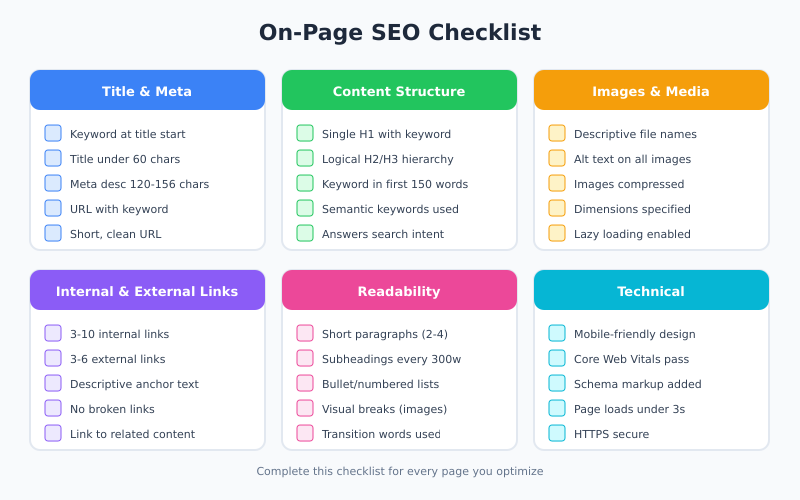
Image Optimization
Images enhance user experience and provide ranking opportunities through Google Images search. However, unoptimized images can destroy your page speed. Here’s how to get images right.
Image SEO Best Practices
- Use descriptive file names. Rename
IMG_4532.jpgtoon-page-seo-checklist.pngbefore uploading. - Write meaningful alt text. Describe what the image shows. Include keywords when relevant and natural. Google relies heavily on alt text to understand images.
- Compress images. Use tools like TinyPNG, ShortPixel, or Squoosh to reduce file size without visible quality loss.
- Choose the right format. Use WebP for best compression, PNG for graphics with transparency, JPEG for photographs.
- Specify dimensions. Set width and height attributes to prevent layout shifts (improves Core Web Vitals).
- Implement lazy loading. Load images only when they enter the viewport to improve initial page speed.
Alt Text Examples
| Bad Alt Text | Good Alt Text |
|---|---|
image1 | On-page SEO checklist with 15 optimization factors |
SEO SEO SEO keywords | Header tag hierarchy diagram showing H1 to H6 structure |
photo | Google Search Console performance report showing clicks and impressions |
Alt text serves two purposes: accessibility for visually impaired users and context for search engines. Write for humans first, then incorporate keywords where they fit naturally.
Internal Linking Strategy
Internal links connect your pages and distribute authority throughout your site. They help users discover related content and help Google understand your site structure and topic relationships.
Internal Linking Best Practices
- Link to relevant content. Only link when it genuinely helps the reader. Random links dilute value.
- Use descriptive anchor text. “Learn more about technical SEO audits” beats “click here.”
- Link deep. Don’t just link to your homepage and main category pages. Link to specific relevant articles.
- Add links from old content. When you publish new content, go back and add links from related older posts.
- Use a reasonable number. There’s no hard limit, but 3-10 internal links per 1,500 words is typical.
- Prioritize important pages. Pages with more internal links pointing to them carry more weight.
Internal linking also creates topic clusters—a pillar page surrounded by related content, all interlinked. This structure signals topical authority to Google. For instance, this on-page SEO guide could link to separate articles on keyword research, link building, and schema markup.
External Linking
Linking out to authoritative sources doesn’t “leak” PageRank—that’s an outdated myth. In fact, external links to relevant, high-quality sources can improve your content’s trustworthiness and help Google understand your topic.
External linking guidelines:
- Link to authoritative sources. Official documentation, research studies, reputable publications.
- Cite statistics and claims. Back up data with sources to build credibility.
- Use
target="_blank"andrel="noopener". Opens links in new tabs without security vulnerabilities. - Avoid linking to competitors for your target keywords. Link to complementary resources instead.
- Check links regularly. Broken external links hurt user experience and can signal neglected content.
According to Google’s SEO Starter Guide, linking to other sites is a good way to provide value to your users. Just ensure you’re linking to genuinely helpful resources.
Schema Markup for On-Page SEO
Schema markup (structured data) helps search engines understand your content at a deeper level. It can also unlock rich results—enhanced search listings with ratings, FAQs, how-to steps, and more.
Common schema types for content pages:
- Article schema: For blog posts and news articles
- HowTo schema: For tutorial content
- FAQ schema: For frequently asked questions
- Breadcrumb schema: For navigation paths
I’ve covered schema implementation extensively in my schema markup guide. The key point for on-page SEO: schema doesn’t directly boost rankings, but rich results dramatically improve CTR, which does influence rankings.
Mobile Optimization
Google uses mobile-first indexing, meaning it primarily uses the mobile version of your content for ranking. If your site isn’t mobile-optimized, you’re essentially invisible to Google.
Mobile SEO Checklist
- Responsive design. Your site should adapt to any screen size automatically.
- Same content on mobile. Don’t hide content on mobile that exists on desktop.
- Readable font sizes. Minimum 16px for body text. No horizontal scrolling.
- Tappable elements. Buttons and links should have adequate spacing (48px minimum).
- No intrusive interstitials. Avoid popups that cover content on mobile.
- Fast loading. Mobile users often have slower connections. Optimize accordingly.
Test your pages with Google’s Mobile-Friendly Test to identify issues. Furthermore, check your site on actual mobile devices—emulators don’t always catch real-world problems.
Core Web Vitals and Page Experience
Core Web Vitals are Google’s metrics for user experience: loading performance (LCP), interactivity (INP), and visual stability (CLS). These are confirmed ranking factors.
| Metric | What It Measures | Good Score |
|---|---|---|
| LCP (Largest Contentful Paint) | Loading performance | ≤2.5 seconds |
| INP (Interaction to Next Paint) | Interactivity | ≤200 milliseconds |
| CLS (Cumulative Layout Shift) | Visual stability | ≤0.1 |
Improving Core Web Vitals requires technical optimizations: image compression, code minification, server response times, and eliminating layout shifts. I’ve written a detailed guide on Core Web Vitals optimization that covers these techniques in depth.
For on-page SEO purposes, focus on:
- Optimizing your largest above-the-fold image (usually the hero image)
- Setting explicit dimensions on all images and embeds
- Avoiding content that shifts during loading
- Minimizing render-blocking resources
E-E-A-T Signals on the Page
E-E-A-T (Experience, Expertise, Authoritativeness, Trustworthiness) isn’t a direct ranking factor, but it influences how Google’s quality raters evaluate content. Pages that demonstrate E-E-A-T tend to rank better, especially for YMYL (Your Money or Your Life) topics.
How to Demonstrate E-E-A-T
- Experience: Share first-hand experience. Use phrases like “In my experience…” or “When I tested this…”
- Expertise: Display credentials. Author bios, about pages, relevant qualifications.
- Authoritativeness: Cite sources. Link to official documentation and reputable research.
- Trustworthiness: Be transparent. Include contact information, privacy policies, and clear sourcing.
On a practical level, this means adding author bylines with bios, linking to authoritative sources, being transparent about limitations, and regularly updating content to maintain accuracy — a discipline that also keeps pages from quietly sliding down the SERP through content decay.
On-Page SEO Checklist
Use this checklist for every page you optimize:
Title and Meta
- ☐ Title tag under 60 characters with keyword at beginning
- ☐ Meta description 120-156 characters with keyword
- ☐ URL contains target keyword, is short and descriptive
Content Structure
- ☐ Single H1 containing primary keyword
- ☐ Logical H2/H3 hierarchy (no skipped levels)
- ☐ Keyword in first 100-150 words
- ☐ Keyword in at least one H2
- ☐ Semantic keywords used naturally throughout
- ☐ Content fully answers search intent
Readability
- ☐ Short paragraphs (2-4 sentences)
- ☐ Subheadings every 300 words maximum
- ☐ Bullet points and numbered lists included
- ☐ Images and visual breaks throughout
- ☐ Transition words for flow
Images
- ☐ Descriptive file names
- ☐ Alt text on all images
- ☐ Images compressed for web
- ☐ Dimensions specified (width/height)
Links
- ☐ 3-10 relevant internal links
- ☐ 3-6 external links to authoritative sources
- ☐ Descriptive anchor text (not “click here”)
- ☐ No broken links
Technical
- ☐ Mobile-friendly design
- ☐ Core Web Vitals passing
- ☐ Schema markup implemented (if applicable)
- ☐ Page loads in under 3 seconds
Common On-Page SEO Mistakes
Avoid these frequent errors that undermine on-page optimization efforts:
- Keyword stuffing. Repeating keywords unnaturally triggers spam filters and hurts readability.
- Ignoring search intent. Optimizing a product page for an informational query won’t work, no matter how good your SEO.
- Duplicate content. Multiple pages targeting the same keyword cannibalize each other’s rankings.
- Missing alt text. Every image needs descriptive alt text for accessibility and SEO.
- Thin content. Pages with little valuable content rarely rank for competitive terms.
- Ignoring mobile. With mobile-first indexing, mobile issues affect desktop rankings too.
- Over-optimization. Perfect keyword density and exact-match anchors look unnatural to Google.
- Neglecting updates. Outdated content loses rankings. Review and refresh regularly.
Bottom Line
On-page SEO is the foundation of search visibility. Without properly optimized pages, your off-page efforts—link building, content promotion, social media—won’t deliver their full potential.
The key principles haven’t changed: create comprehensive content that matches search intent, structure it logically with proper headings, optimize your title and meta description for clicks, and ensure a fast, mobile-friendly experience. What has changed is the sophistication of Google’s algorithms—they’re better at understanding content quality, context, and user experience signals.
Start with the checklist above. Audit your most important pages first—your homepage, key landing pages, and top-performing content. Fix the fundamentals before moving on to advanced tactics. In my experience, getting on-page SEO right delivers faster, more sustainable results than chasing the latest algorithm update.
For related guidance, check out my articles on technical SEO audits, keyword research, and link building strategies.