Technical SEO Audit Checklist: 25 Points That Actually Matter
Most technical SEO audits waste time on issues that don’t move rankings. You check hundreds of boxes, generate impressive reports, and nothing changes. The problem isn’t thoroughness — it’s prioritization. This checklist focuses on the technical factors that actually impact search visibility in 2025, organized by impact level so you fix what matters first.
A proper technical SEO audit examines how search engines crawl, render, and index your site. It identifies barriers that prevent your content from ranking, regardless of how good that content is. In my experience auditing sites across industries, roughly 20% of technical issues cause 80% of ranking problems. This checklist targets that critical 20%.
Before You Start: Essential Tools
You don’t need expensive enterprise tools for a thorough audit. However, you do need access to actual crawl and performance data — not just surface-level scans.
Required (free):
- Google Search Console — crawl errors, indexing status, Core Web Vitals
- PageSpeed Insights — performance diagnostics with real user data
- Chrome DevTools — rendering inspection, network analysis
Recommended:
- Screaming Frog — comprehensive site crawling (free up to 500 URLs)
- Ahrefs or Semrush — backlink analysis and competitive benchmarking
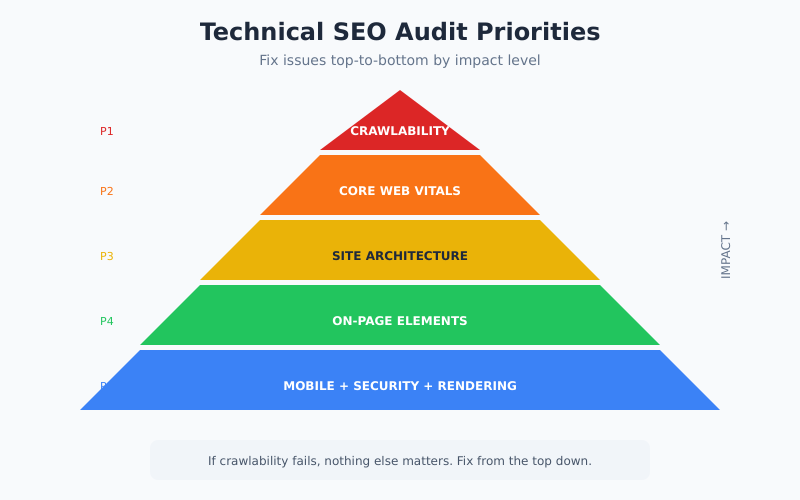
Priority 1: Crawlability and Indexing
If search engines can’t access your pages, nothing else matters. These checks identify fundamental access barriers that block indexing entirely.
Robots.txt Configuration
Your robots.txt file controls which pages crawlers can access. A single misplaced directive can deindex your entire site. Check these items:
- Verify robots.txt is accessible at
yourdomain.com/robots.txt - Confirm no
Disallow: /directive blocks your entire site - Check that important directories aren’t accidentally blocked
- Ensure CSS and JavaScript files are crawlable (Google needs these to render pages)
- Verify your XML sitemap URL is listed
Common mistake: Blocking /wp-admin/ is fine, but blocking /wp-includes/ breaks JavaScript rendering for WordPress sites.
Indexing Status
In Google Search Console, navigate to Pages → Indexing to identify problems. Pay attention to these status messages:
- “Crawled – currently not indexed” — Google found the page but deemed it low quality or duplicate
- “Discovered – currently not indexed” — crawl budget issues; Google knows the URL but hasn’t prioritized crawling it
- “Blocked by robots.txt” — intentional or accidental access restriction
- “Excluded by noindex tag” — page-level indexing prevention
For pages stuck in “Crawled – currently not indexed,” the issue is typically thin content, duplicate content, or poor internal linking. Consequently, fixing these requires content improvements rather than technical changes.
XML Sitemap Audit
Your sitemap tells search engines which pages matter. Verify these elements:
- Sitemap contains only indexable pages (no noindex, no redirects, no 404s)
- All important pages are included
- Sitemap is submitted in Search Console and shows no errors
- Last modified dates are accurate (not all showing the same date)
- Sitemap size is under 50MB and 50,000 URLs per file
Priority 2: Core Web Vitals and Performance
Page speed directly impacts rankings. Google’s Core Web Vitals measure real user experience through three metrics: LCP (loading), INP (interactivity), and CLS (visual stability). Sites failing these thresholds face ranking disadvantages, especially on mobile.
Performance Thresholds
Check your site’s field data in Search Console under Experience → Core Web Vitals. Here are the targets:
| Metric | Good | Needs Improvement | Poor |
|---|---|---|---|
| LCP (Largest Contentful Paint) | < 2.5s | 2.5s – 4.0s | > 4.0s |
| INP (Interaction to Next Paint) | < 200ms | 200ms – 500ms | > 500ms |
| CLS (Cumulative Layout Shift) | < 0.1 | 0.1 – 0.25 | > 0.25 |
Field data (from real users) matters more than lab data for rankings. However, lab data from PageSpeed Insights helps diagnose specific issues.
Common Performance Issues
Based on my audits, these problems appear most frequently:
- Unoptimized images — missing WebP/AVIF formats, no lazy loading, missing dimensions
- Render-blocking resources — CSS and JavaScript that delays initial paint
- Third-party scripts — analytics, chat widgets, and ad tags that block the main thread
- No CDN — slow server response for geographically distant users
- Missing compression — Brotli or Gzip not enabled
Fix LCP issues first — they have the strongest correlation with ranking improvements in my testing.
Priority 3: Site Architecture
How your pages link together determines how search engines understand your site’s structure and distribute authority. Poor architecture buries important content.
Click Depth Analysis
Important pages should be reachable within 3 clicks from the homepage. Deeper pages receive less crawl attention and accumulate less authority. Use Screaming Frog’s crawl depth report to identify buried content.
Check these items:
- Key landing pages are within 3 clicks of homepage
- No orphan pages (pages with zero internal links pointing to them)
- Category and tag pages link to relevant content
- Blog posts include contextual links to related articles
Internal Link Distribution
Pages with more internal links tend to rank better. However, link quality matters more than quantity. Audit your internal linking patterns:
- High-priority pages receive sufficient internal links
- Anchor text is descriptive (not “click here” or “read more”)
- Links appear in body content, not just navigation
- Related content sections exist on articles
In Search Console, the Links report shows which pages have the most internal links. Compare this against your actual priority pages — mismatches indicate architecture problems.
Priority 4: On-Page Technical Elements
These page-level elements directly influence how search engines understand and display your content.
Title Tags and Meta Descriptions
Title tags remain a strong ranking signal. Meta descriptions don’t affect rankings directly but impact click-through rates. Audit for these issues:
- Missing titles — every page needs a unique title
- Duplicate titles — often indicates duplicate content problems
- Truncated titles — keep under 60 characters to avoid cutoff in SERPs
- Missing meta descriptions — provide descriptions for all important pages
- Keyword placement — primary keyword near the beginning of title
Heading Structure
Headings communicate content hierarchy to search engines. Check these elements:
- Each page has exactly one H1 tag
- H1 contains the primary keyword
- Heading levels are sequential (H2 follows H1, H3 follows H2)
- Headings accurately describe section content
Canonical Tags
Canonical tags consolidate ranking signals for duplicate or similar pages. Incorrect canonicalization can accidentally deindex pages. If you serve multiple language or regional versions, pair canonicals with correct hreflang annotations — the two signals are easy to break together. Verify these conditions:
- Every page has a self-referencing canonical tag
- Canonicals point to the correct URL version (with or without trailing slash, www or non-www)
- Paginated pages canonical to themselves, not page 1
- No canonical chains (A → B → C)
Priority 5: Mobile Optimization
Google uses mobile-first indexing, meaning it primarily crawls and indexes the mobile version of your site. Mobile issues directly impact desktop rankings too.
Mobile Usability Checks
In Search Console, check Experience → Mobile Usability for flagged issues. Common problems include:
- Content wider than screen — horizontal scrolling required
- Text too small to read — font size under 16px
- Clickable elements too close together — tap targets under 48px
- Viewport not configured — missing meta viewport tag
Additionally, verify that mobile and desktop versions have identical content. Hidden content on mobile may not be indexed.
Priority 6: Security and HTTPS
HTTPS is a confirmed ranking factor. Security issues also trigger browser warnings that destroy user trust.
Security Checklist
- All pages load over HTTPS
- HTTP URLs redirect to HTTPS (301 redirect)
- No mixed content warnings (HTTPS pages loading HTTP resources)
- SSL certificate is valid and not expiring soon
- HSTS header is implemented for additional security
Use Chrome DevTools Security panel to identify mixed content issues on specific pages.
Priority 7: JavaScript Rendering
Modern sites rely heavily on JavaScript. Search engines can render JavaScript, but problems during rendering can hide content from indexing.
Rendering Audit
Use Google’s URL Inspection tool in Search Console to see the rendered HTML. Compare it to what users see:
- Critical content appears in rendered HTML
- Internal links are present after rendering
- No JavaScript errors block rendering
- Lazy-loaded content is accessible to crawlers
If important content doesn’t appear in rendered HTML, consider server-side rendering or prerendering for critical pages. For the full diagnostic workflow, see our deep dive on JavaScript SEO rendering and indexing pitfalls.
Priority 8: AI Crawler Readiness (New for 2025)
Search now extends beyond Google. AI platforms like ChatGPT, Perplexity, and Claude use their own crawlers to gather information. Being visible to these systems increasingly matters for discovery.
AI Optimization Checks
- AI crawlers aren’t blocked in robots.txt (check for GPTBot, PerplexityBot, ClaudeBot)
- Content is accessible without JavaScript when possible
- Clear, well-structured content that AI can parse
- Authoritative signals present (author info, sources, dates)
This area is evolving rapidly. Monitor your analytics for traffic from AI-assisted search and adjust accordingly.
Audit Frequency and Monitoring
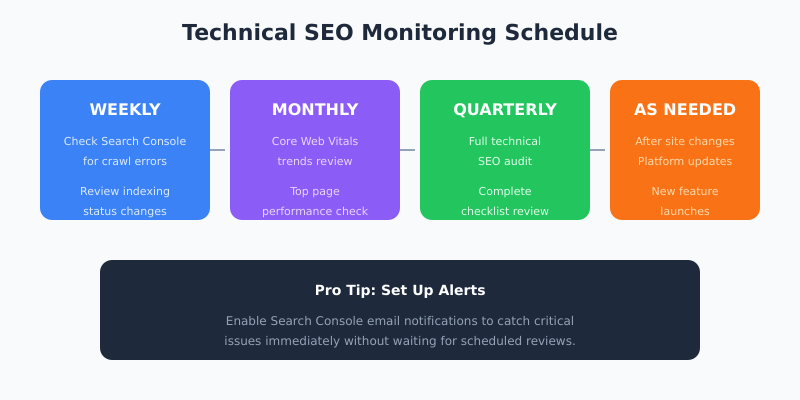
Technical SEO isn’t a one-time fix. Sites change, platforms update, and new issues emerge. Establish a monitoring routine:
| Frequency | Action |
|---|---|
| Weekly | Check Search Console for new crawl errors and indexing issues |
| Monthly | Review Core Web Vitals trends and top page performance |
| Quarterly | Full technical audit using this checklist |
| After changes | Audit affected areas whenever you update site structure, change platforms, or launch new features |
Set up Search Console email alerts to catch critical issues immediately. A sudden spike in crawl errors often indicates a serious problem that needs urgent attention.
Bottom Line
A technical SEO audit should identify issues that actually block rankings, not generate busywork. Start with crawlability and indexing — if search engines can’t access your pages, nothing else matters. Then move to Core Web Vitals and site architecture, which have the strongest impact on rankings. Finally, address on-page elements, mobile optimization, security, and rendering issues.
The checklist above covers the technical factors that matter most in 2025. Run through it quarterly, fix issues by priority level, and monitor Search Console between audits. Technical SEO done right creates a foundation that lets your content compete on merit.