UTM Parameters: Campaign Tracking Setup and Best Practices
Your campaign just drove 500 clicks. But which email subject line worked? Which social post converted? Without UTM parameters, you’re flying blind. These simple URL tags transform vague traffic data into actionable campaign intelligence.
UTM parameters are the backbone of marketing attribution. They tell Google Analytics 4 exactly where each visitor came from, which campaign brought them, and what content they clicked. In other words, they connect marketing spend to actual results.
This guide covers everything you need to implement UTM tracking correctly: the five core parameters, naming conventions that prevent data fragmentation, GA4 integration, and the mistakes that silently corrupt your analytics.
What Are UTM Parameters?
UTM parameters (Urchin Tracking Module) are text snippets added to URLs that pass campaign information to analytics platforms. When someone clicks a UTM-tagged link, GA4 captures the parameter values and attributes that session to the specified source, medium, and campaign.
A standard UTM-tagged URL looks like this:
https://example.com/landing-page?utm_source=newsletter&utm_medium=email&utm_campaign=january-promoEverything after the ? represents UTM parameters. Each parameter consists of a name-value pair separated by =, with multiple parameters joined by &.
Without UTM tags, GA4 categorizes most external traffic as “direct” or “referral” — broad buckets that reveal nothing about campaign performance. However, with proper UTM implementation, you can track exactly which newsletter issue, social post, or ad variant drove each conversion.
The Five Core UTM Parameters
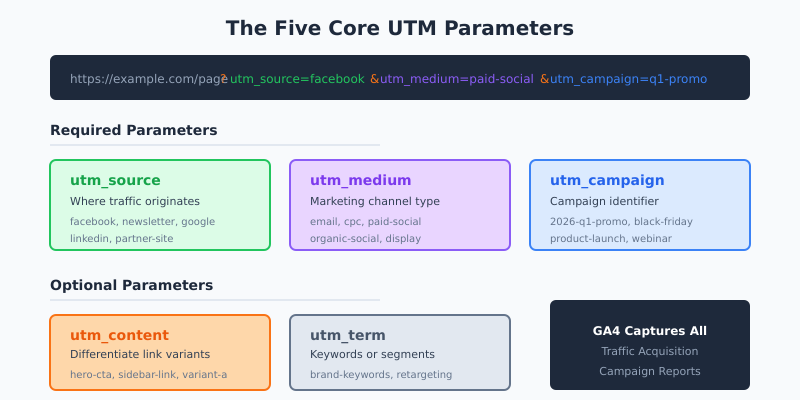
Google Analytics recognizes five standard UTM parameters. Three are essential for every tagged URL. Two are optional but valuable for granular tracking.
Required Parameters
utm_source — Identifies where the traffic originates. This is the platform, website, or publication sending visitors to you.
- Examples:
newsletter,facebook,linkedin,google,partner-site
utm_medium — Describes the marketing channel type. This parameter should align with GA4’s Default Channel Grouping for accurate reporting.
- Examples:
email,cpc,paid-social,organic-social,affiliate,display
utm_campaign — Names the specific marketing initiative. Use descriptive, dated names that your team will recognize months later.
- Examples:
2026-01-product-launch,black-friday-sale,q1-lead-gen,webinar-seo-basics
Optional Parameters
utm_content — Differentiates between multiple links in the same campaign. Essential for A/B testing email variants or comparing CTA placements.
- Examples:
hero-button,sidebar-banner,footer-link,variant-a,blue-cta
utm_term — Originally designed for paid search keywords. Now commonly used for audience segments or additional test variables.
- Examples:
marketing-managers,retargeting-audience,broad-match
| Parameter | Purpose | Required | Example Value |
|---|---|---|---|
| utm_source | Traffic origin (platform/site) | Yes | facebook |
| utm_medium | Marketing channel type | Yes | paid-social |
| utm_campaign | Campaign name/identifier | Yes | 2026-q1-promo |
| utm_content | Link/creative variant | No | carousel-ad-v2 |
| utm_term | Keyword or audience segment | No | cmo-audience |
New UTM Parameters in GA4
Google Analytics 4 introduced three additional parameters that provide even more granular tracking capabilities:
- utm_source_platform — The platform managing the campaign (e.g.,
google-ads,meta-ads,hubspot) - utm_creative_format — The creative type (e.g.,
video,carousel,static-image) - utm_marketing_tactic — The targeting approach (e.g.,
retargeting,prospecting,lookalike)
These newer parameters are optional but valuable for organizations running complex, multi-platform campaigns. They help answer questions like “Which ad platform delivers the best ROI?” and “Do video ads outperform static images?”
How to Create UTM-Tagged URLs
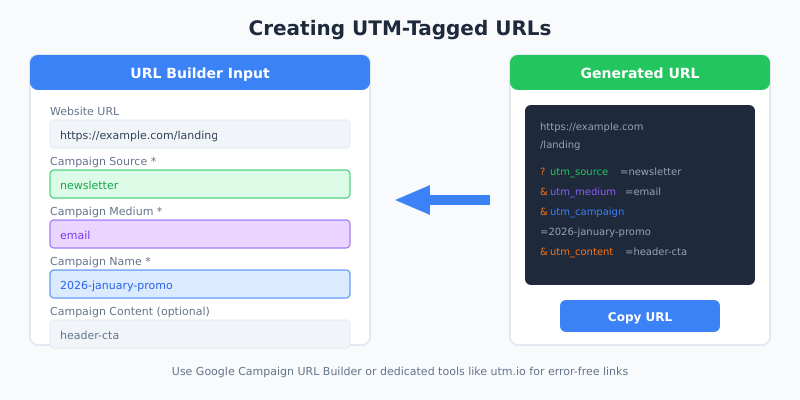
You have two options for generating UTM URLs: manual construction or dedicated tools. Both work. Tools reduce errors.
Manual URL Construction
Building UTM URLs manually requires following a specific syntax:
- Start with your destination URL:
https://yoursite.com/landing-page - Add a question mark to begin parameters:
? - Add each parameter as
name=value - Separate multiple parameters with
&
The resulting URL:
https://yoursite.com/landing-page?utm_source=linkedin&utm_medium=organic-social&utm_campaign=2026-thought-leadership&utm_content=post-carouselParameter order doesn’t matter. However, consistency in your naming conventions matters enormously.
Google Campaign URL Builder
Google provides a free Campaign URL Builder that generates properly formatted UTM URLs. Simply fill in the fields and copy the resulting link.
This tool prevents syntax errors like missing ampersands or incorrectly encoded characters. For teams generating dozens of tracked URLs weekly, it’s the minimum viable solution.
UTM Management Platforms
For organizations with multiple team members creating tracked links, dedicated UTM management tools offer significant advantages:
- Centralized naming conventions — Enforce consistent parameter values across teams
- Link shortening — Convert long UTM URLs into branded short links
- Campaign libraries — Store and reuse campaign definitions
- Audit trails — Track who created which links and when
Tools like utm.io, Bitly, and Rebrandly provide these capabilities. The investment makes sense once UTM inconsistencies start fragmenting your data.
UTM Naming Conventions: The Foundation of Clean Data
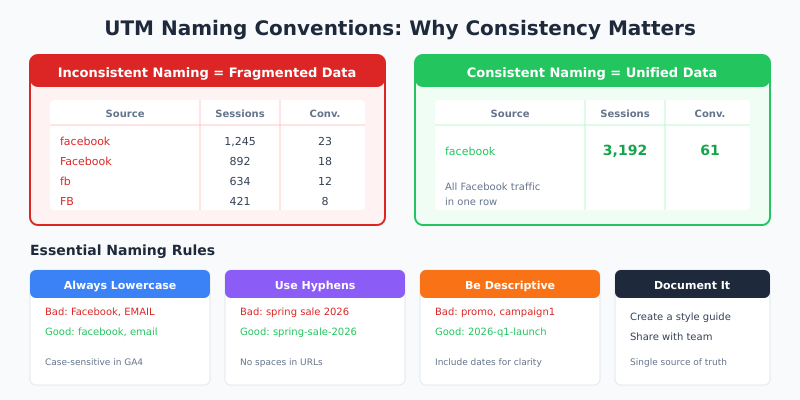
Inconsistent naming is the single biggest UTM mistake. It fragments your data into unusable pieces.
Consider this scenario: your team uses facebook, Facebook, fb, and FB interchangeably for utm_source. In GA4, these appear as four separate traffic sources. Your Facebook campaign data is now split across four rows, making accurate analysis impossible.
Essential Naming Rules
1. Always use lowercase
UTM parameters are case-sensitive. Email and email are different values. Therefore, establish a lowercase-only rule and enforce it across your organization.
2. Use hyphens instead of spaces
Spaces in URLs become %20, creating ugly, error-prone links. Use hyphens (-) or underscores (_) instead. Pick one and stick with it.
- Good:
spring-sale-2026 - Bad:
spring sale 2026
3. Be specific but concise
Your future self needs to understand what utm_campaign=promo1 meant. Instead, use 2026-03-spring-sale. Include dates when campaigns recur.
4. Match GA4 Default Channel Grouping
GA4 automatically categorizes traffic into channels based on utm_medium values. To ensure proper categorization, use these standard values:
| Channel | utm_medium value |
|---|---|
email |
|
| Paid Search | cpc or ppc |
| Paid Social | paid-social or paidsocial |
| Organic Social | organic-social or social |
| Display | display or banner |
| Affiliate | affiliate |
| Referral | referral |
Create a UTM Style Guide
Document your naming conventions in a shared style guide. Include:
- Approved values for each parameter
- Naming patterns with examples
- Who can create new campaign names
- Review and approval process for new values
A simple spreadsheet works. The key is making it accessible and keeping it updated. In my experience, organizations that skip this step spend twice as much time cleaning data later.
Viewing UTM Data in GA4
Once your UTM-tagged links are live and generating clicks, you’ll want to analyze the data in Google Analytics 4. GA4 provides several reports for viewing campaign performance.
Traffic Acquisition Report
Navigate to Reports → Acquisition → Traffic acquisition. This report shows sessions grouped by their traffic source.
- Click the dimension dropdown (default shows “Session default channel group”)
- Select “Session source/medium” to see combined source and medium values
- Alternatively, select “Session campaign” to group by utm_campaign values
You can add secondary dimensions to drill deeper. For instance, add “Session campaign” as a secondary dimension while viewing by source/medium.
User Acquisition Report
The User acquisition report shows how users first arrived at your site, regardless of subsequent visits. This matters for understanding which campaigns drive new user acquisition versus return visits.
Explorations for Custom Analysis
For deeper analysis, use GA4’s Explorations feature:
- Go to Explore → Create a new exploration
- Add dimensions: Session source, Session medium, Session campaign, Session manual ad content (utm_content)
- Add metrics: Sessions, Conversions, Revenue
- Build a free-form table to analyze campaign performance
Explorations give you flexibility that standard reports don’t provide. You can compare specific campaigns, filter by date ranges, and segment by user properties.
Real-Time Testing
Before launching a campaign, test your UTM links using GA4’s Real-time report:
- Open your UTM-tagged URL in a browser
- In GA4, go to Reports → Realtime
- Look for your session in the traffic source data
- Verify that source, medium, and campaign values appear correctly
This quick test catches typos and encoding errors before they corrupt your campaign data. I recommend testing every new UTM link, especially for high-budget campaigns.
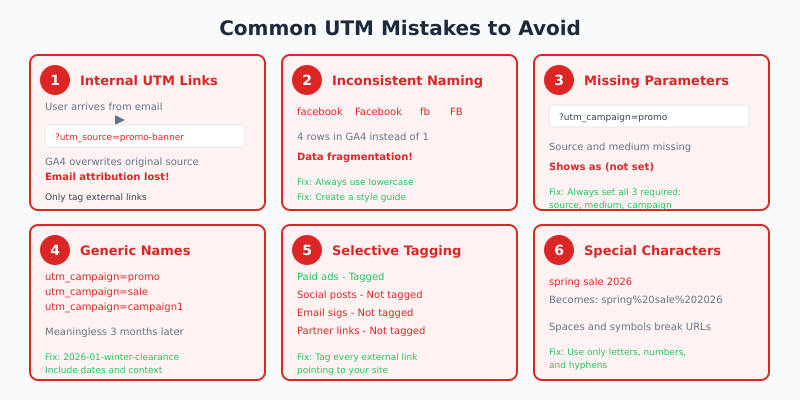
Common UTM Mistakes to Avoid
After implementing UTM tracking across dozens of organizations, I’ve seen the same errors repeatedly. Here are the mistakes that cause the most damage — and how to prevent them.
Using UTMs on Internal Links
This is the most damaging UTM mistake. Never add UTM parameters to links within your own website.
When a user clicks an internal UTM-tagged link, GA4 starts a new session and attributes it to that UTM source. The original traffic source — the one that actually brought the user to your site — gets overwritten.
For example, a user arrives from your email campaign, browses your site, and clicks an internal link tagged with ?utm_source=promo-banner. GA4 now shows that conversion came from “promo-banner” instead of your email. Your email campaign data is now wrong.
UTM parameters are exclusively for external links pointing to your website. Internal navigation should never be tagged.
Inconsistent Naming
As mentioned earlier, inconsistency fragments your data. Specifically, watch for:
- Case variations:
Facebookvsfacebook - Abbreviations:
fbvsfacebook - Spacing:
email-newslettervsemail_newsletter - Typos:
newlsetterinstead ofnewsletter
Missing Required Parameters
If you set one UTM parameter, set all three required ones. A URL with only utm_campaign will show “(not set)” for source and medium in GA4 reports. This makes the data nearly useless.
Overly Generic Campaign Names
Names like promo, sale, or campaign1 tell you nothing three months later. Instead, use descriptive, dated names:
- Bad:
promo - Good:
2026-01-winter-clearance
Not URL-Encoding Special Characters
Certain characters break URLs if not encoded. Spaces become %20, ampersands become %26. The safest approach: avoid special characters entirely. Stick to letters, numbers, and hyphens.
Forgetting to Track All Channels
Many teams only tag paid campaigns while ignoring organic social posts, email signatures, partner links, and offline-to-online campaigns (QR codes, print materials). Consequently, significant traffic appears as direct or unattributed.
Tag every external link pointing to your site. The five minutes spent creating UTM links pays back in attribution clarity.
UTM Tracking for Specific Channels
Different marketing channels have unique UTM considerations. Here’s how to approach each one.
Email Marketing
Email is where UTM tracking delivers the most value. Tag every link in every email, including:
- Primary CTAs
- Secondary links
- Footer links
- Image links
Use utm_content to differentiate link positions. This reveals whether header CTAs outperform footer links.
utm_source=newsletter
utm_medium=email
utm_campaign=2026-01-weekly-digest
utm_content=header-cta
Social Media
For organic social posts, use:
utm_source=linkedin
utm_medium=organic-social
utm_campaign=thought-leadership
utm_content=carousel-post
For paid social, adjust the medium:
utm_source=facebook
utm_medium=paid-social
utm_campaign=2026-q1-retargeting
utm_content=video-ad-v2
Paid Search
Google Ads can auto-tag URLs, but manual UTM tagging gives you more control and consistency with other channels:
utm_source=google
utm_medium=cpc
utm_campaign=brand-keywords
utm_term=company-name
Affiliate and Partner Links
Track partner-driven traffic to measure partnership ROI:
utm_source=partner-name
utm_medium=affiliate
utm_campaign=q1-partnership
utm_content=blog-mention
URL Shorteners and UTM Links
Long UTM-tagged URLs look unprofessional and can discourage clicks, especially on social media. A URL with five parameters easily exceeds 200 characters.
URL shorteners solve this problem. Services like Bitly, Rebrandly, and TinyURL create compact redirect links that preserve all UTM parameters. The user sees a clean, short URL while your tracking remains intact.
Benefits of using shortened UTM links:
- Professional appearance in social posts and emails
- Character savings for platforms with limits (Twitter/X)
- Click tracking at the shortener level (additional data layer)
- Ability to edit destination URLs without changing the short link
For brand consistency, consider using a branded short domain (e.g., go.yourbrand.com/campaign) rather than generic shorteners.
Auditing Your UTM Implementation
UTM hygiene requires ongoing maintenance. Schedule monthly audits to catch issues before they compound.
Monthly Audit Checklist
- Review source/medium report — Look for unexpected values, typos, and variations that should be consolidated
- Check for (not set) values — These indicate missing required parameters
- Verify channel groupings — Ensure traffic is categorizing correctly based on utm_medium values
- Test active campaign links — Confirm current UTM links work and track properly
- Update style guide — Add any new approved values; remove deprecated ones
In GA4, navigate to Reports → Acquisition → Traffic acquisition and scan for anomalies. Look for values like facebook and Facebook appearing as separate rows — that’s a sign of inconsistent tagging.
When NOT to Use UTM Parameters
UTM tracking isn’t appropriate for every situation. Specifically, avoid using UTMs in these cases:
- Internal website links — As discussed, this breaks attribution
- Links within web applications — Same session, same issue
- Google Ads with auto-tagging enabled — Can cause conflicts; choose one system
- Links in documents that might be shared — The original campaign context may not apply to subsequent viewers
The core principle: UTM parameters track how people arrive at your site from external sources. They’re not for tracking behavior within your digital properties.
UTM parameters transform ambiguous traffic data into precise campaign attribution. They’re simple to implement but require discipline to maintain.
Start with the fundamentals: tag every external link with utm_source, utm_medium, and utm_campaign. Establish naming conventions before you need them. Document everything in a shared style guide.
Then expand: use utm_content for A/B testing, utm_term for audience segmentation, and the newer GA4 parameters for platform and creative analysis.
The organizations that get the most value from UTM tracking aren’t those with the most sophisticated setups. They’re the ones with consistent, well-documented implementations that every team member follows. Clean data beats complex data every time.
For more on connecting UTM data to conversion analysis, see our guide on GA4 event and conversion tracking. To understand how this campaign data fits into broader optimization efforts, explore our CRO hypothesis matrix framework.